
SCUBAPRO Aladin One Matrix review:my experience after 20 dives.
I bought the SCUBAPRO Aladin One Matrix as my first personal dive computer and have used it for around 20 dives, mainly in Tenerife. In this review I cover what it is like underwater, how easy it is to read and use, Bluetooth and LogTRAK, the CR2450 battery, the strap, the screen protector and the limitations I would consider before buying it.
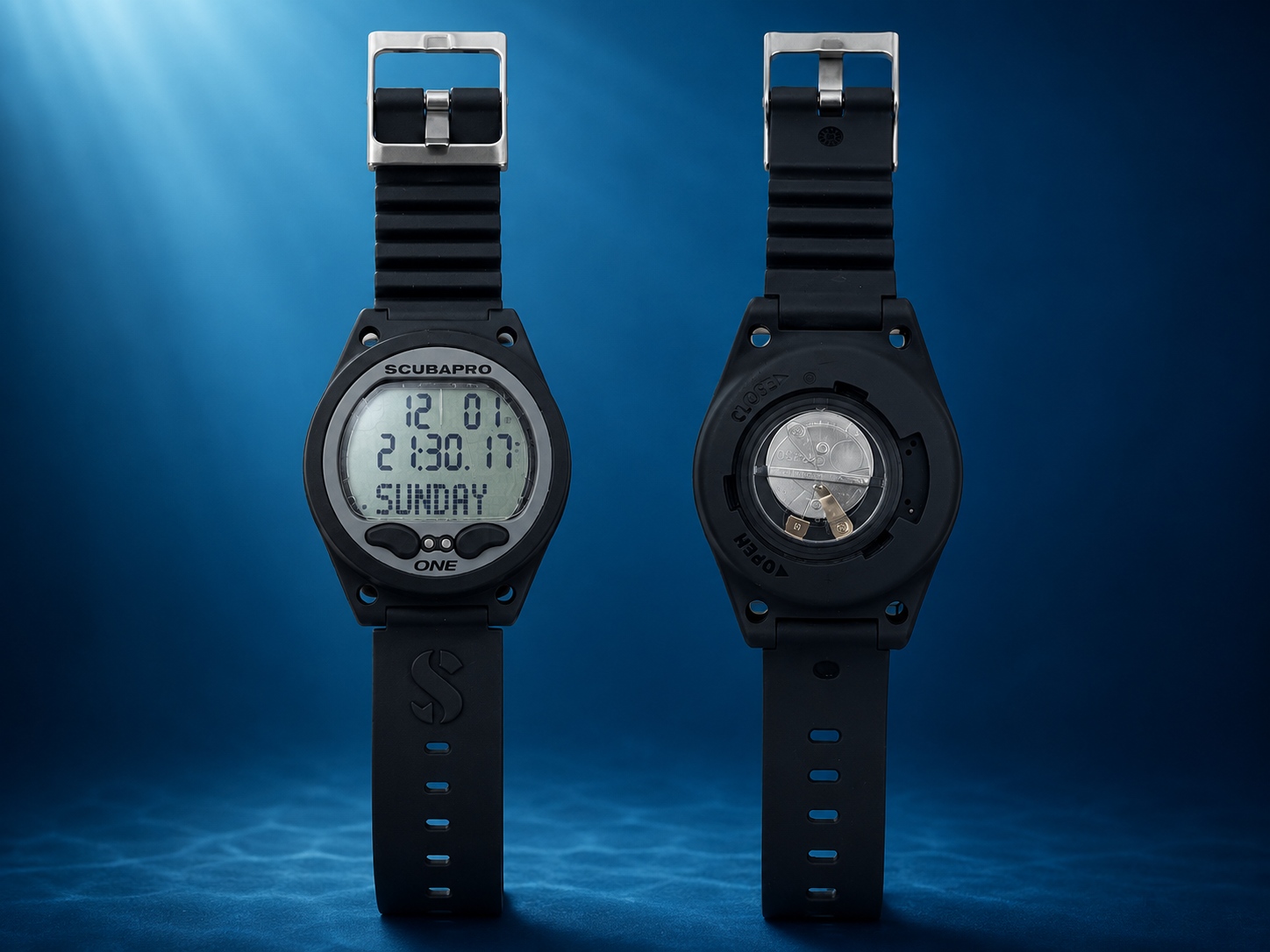
I would buy it again as a first dive computer. Its strongest points for me are the clear display, simple two-button operation, useful backlight, Bluetooth and user-replaceable battery. I would look at other models if I needed advanced multi-gas features, a colour display or wireless tank pressure integration.
Affiliate link: if you buy through this link, I may earn a commission at no extra cost to you.
Is it a good first dive computer?
For me, yes. I bought it specifically as my first personal dive computer and, after around 20 dives, I still think it was a good choice.
It is not trying to compete with colour-screen computers or models with wireless tank pressure integration. Its strength is simpler: giving you the important information clearly without adding unnecessary complexity underwater.
My experience with the SCUBAPRO Aladin One Matrix
I started diving two years ago. I first completed my PADI Open Water certification and later my Advanced. At the moment I have around 20 dives, most of them in Tenerife, in places such as Radazul, Tabaiba, El Porís, Abades and Los Cristianos.
When I started buying my own diving gear, the dive computer was my first major purchase. I did not want to depend on rental computers or turn up for every dive using a different device.
I wanted to become familiar with the same display, understand the information underwater more easily and keep a clearer record of my dives afterwards.
Main features
In real use, the features that have mattered most to me are not the full specification list but four things: readability, backlight, Bluetooth and being able to replace the battery.
Is it easy to use?
In my experience, yes. When you are starting out, you already have plenty to think about: buoyancy, air consumption, your buddy, depth, time and everything happening around you.
That is why I wanted a dive computer that would not make the dive more complicated, but would instead help me understand it better. I have not found the menus particularly difficult for the information I need in normal recreational diving.
Underwater readability and backlight
One of the things I like most is how clear the display is and the comfortable size of the numbers. Underwater, the last thing you want is to strain your eyes or hesitate over what you are reading.
I also see the backlight as a real positive, particularly during night dives or in low-light conditions. It does not replace a good dive light or proper dive planning, but it makes checking your information much easier.
Bluetooth and LogTRAK: are they useful?
For me, yes. Being able to transfer the data to LogTRAK is useful when I want to review each dive afterwards.
I can check the dive profile, times and other information without having to write everything down as soon as I get out of the water. It is not essential for diving, but it is one of those features you end up appreciating when you want to keep an organised log.
CR2450 battery and maintenance
Another thing I appreciate is that the battery can be removed and replaced. The Aladin One Matrix uses a CR2450 battery.
For someone who is just starting out and wants some control over basic maintenance, I find this practical. Any work on a dive computer should still be done carefully, making sure the battery compartment, O-ring and cover are correctly fitted to maintain a watertight seal.
Affiliate link: you can check CR2450 batteries here. At no extra cost to you.
View CR2450 batteries on AmazonWhat I like most
- Easy to use.
- Easy to read underwater.
- Large, clear numbers.
- The backlight is useful for night dives.
- The battery can be replaced.
- You can log dives with LogTRAK.
- I think it is a well-balanced first personal dive computer.
What I would improve
- The strap can feel a little long.
- Any excess strap needs to be folded back and secured.
- The screen protector should be fitted carefully.
- There is no colour display or wireless tank pressure integration.
- Divers looking for more advanced features will need to move upmarket.
Does the Aladin One Matrix fit what you need?
If your priority is a simple, readable recreational dive computer with Bluetooth, backlight and a battery you can replace yourself, the Aladin One Matrix still makes sense to me as a first personal computer. If you already know you want more advanced multi-gas features or a more modern colour display, compare it with the alternatives before deciding.
My experience with the strap and screen protector
The computer comes with a silicone screen protector, which I find useful for reducing the risk of scratches. However, it is worth fitting it carefully. If it gets dirty while you are handling it, you can end up with visible marks that are difficult to remove.
The strap, meanwhile, feels a little long to me. It has never been a serious problem because it can be folded back and secured, but it is one of those small details worth knowing before you buy it.
I would recommend it to…
- Open Water or Advanced divers looking for their first computer.
- Recreational divers who prioritise readability and simplicity.
- Divers who want to keep a better record of their dives.
- Anyone looking for a practical option without paying for features they may not yet need.
I would look elsewhere if…
- You want a colour display.
- You want wireless tank pressure integration.
- You need advanced multi-gas management.
- You want something closer to a modern sports smartwatch.
Aladin One Matrix vs other beginner dive computers
The SCUBAPRO Aladin One Matrix competes with models such as the Mares Puck 4, Cressi Leonardo 2.0, Cressi Donatello, Suunto Zoop Novo and Aqualung i300C.
If you are deciding between them, I have put together a dedicated comparison covering ease of use, display, connectivity, battery and how much room each model gives you to progress.
Compare beginner dive computersSCUBAPRO Aladin One Matrix FAQ
Is it good for beginners?
In my experience, yes. I bought it as my first dive computer and I think it is particularly well suited to a recreational diver looking for a model that is easy to use and easy to read underwater.
Does it have Bluetooth?
Yes. It lets you transfer dive data and review it later in LogTRAK.
What battery does it use?
It uses a user-replaceable CR2450 battery.
Is it easy to read on night dives?
In my experience, yes. The backlight is particularly useful during night dives or in low-light conditions.
Is the Aladin One Matrix worth buying in 2026?
In my case, yes, provided you find it at a reasonable price and you are mainly looking for a simple, readable recreational dive computer. It does not have the display or features of some modern high-end models, but for my recreational diving I have not missed those features.
Related diving guides and reviews
Would I buy the Aladin One Matrix again?
Yes. If I had to build my first diving kit again, I would still start with the dive computer. It helped me gain confidence, become familiar with the same display and understand my dives better.
It is not trying to be the flashiest or most advanced computer. For me, that is part of the appeal: a clear display, simple operation and the features I actually need for recreational diving.
Check price on Amazon